What Is Drawing Management? A Guide for Engineering & CAD Files
Drawing management helps engineering companies organize, find and control drawings, CAD files and the information stored inside them. Learn how drawing management differs from document management and PDM, and when a searchable engineering file library becomes useful.
Drawing management often starts with software almost every engineering company already has: Windows Explorer and Microsoft Excel.
The CAD files are stored in project or product folders, while an Excel spreadsheet keeps track of drawing numbers, descriptions, revisions, materials and other important information. For a small engineering archive, this can work remarkably well.
As years of projects accumulate, however, the drawing register grows. Files are copied, revisions change, employees create new folders and the information in Excel can start to differ from the information stored inside the CAD files themselves.
Finding the right drawing can then become surprisingly difficult.
Drawing management is the process of organizing, storing, finding and controlling engineering drawings and their associated information. In a modern engineering environment, that means more than managing PDFs or printed drawings. It can also include CAD parts, assemblies, sheet metal models, drawing files, revisions and the metadata stored inside those files.
Good drawing management should ultimately answer a simple question:
Can the right technical information be found quickly when somebody needs it?
What Is Drawing Management?
At its simplest, drawing management provides a structured way to store and retrieve technical drawings.
For many companies, the first drawing management system develops naturally. Nobody necessarily decides to implement one. A folder structure is created for the first project, drawing numbers are assigned and eventually somebody creates an Excel spreadsheet to keep track of everything.
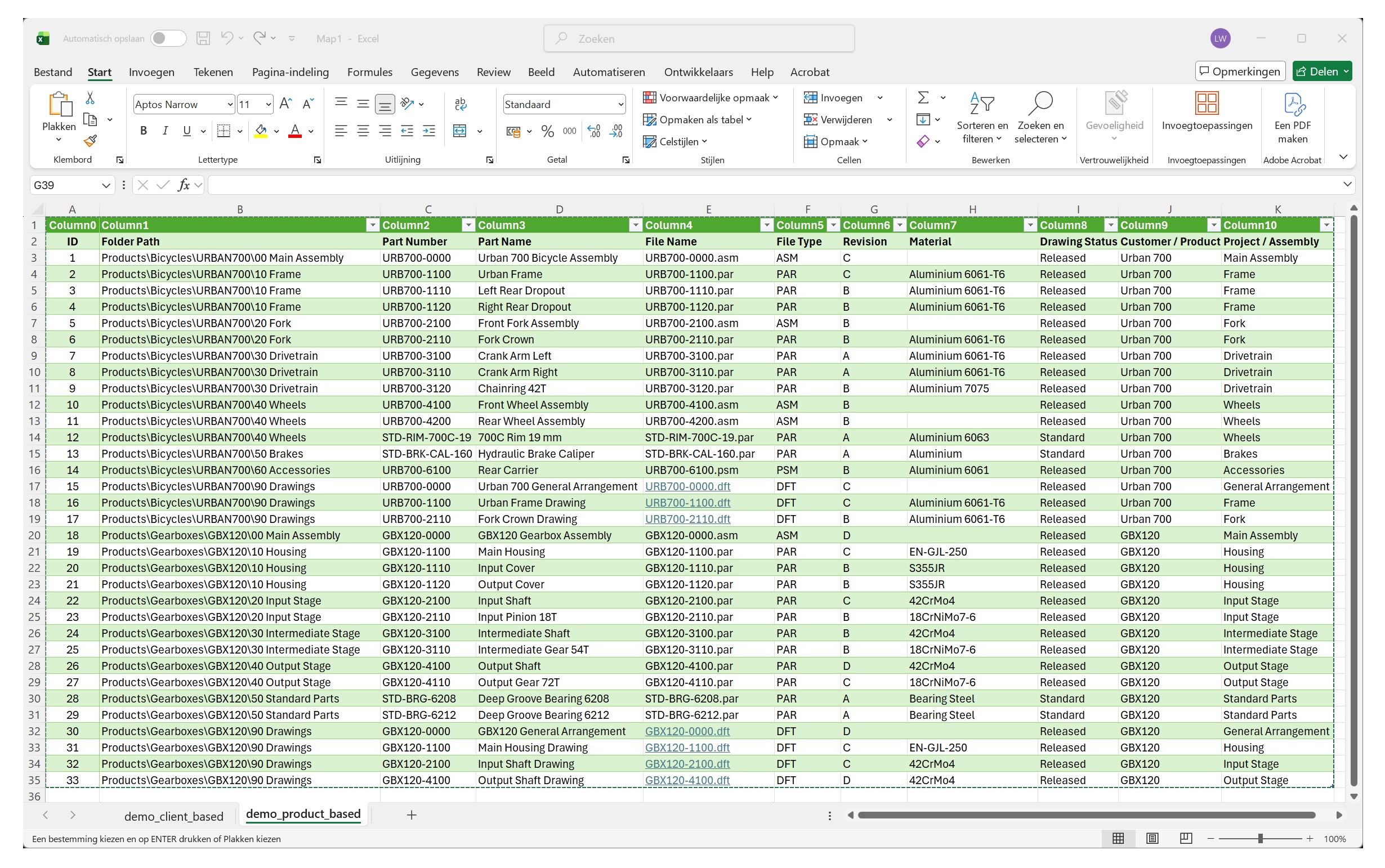
The spreadsheet becomes the drawing register.
A typical drawing register might contain:
- Part number
- Part name or description
- Revision
- Customer
- Project number
- Material
- Drawing status
- File name
- File or folder location
This provides something that folders alone cannot easily provide: a single searchable overview of the engineering archive.
An employee can sort the spreadsheet by part number, filter it by customer or search for a description without knowing exactly where the corresponding CAD file is stored.
For many small engineering companies, this may be all the drawing management they need.
Why Engineering Drawing Management Is Different
Engineering drawings are different from most ordinary business documents because they are usually part of a larger technical structure.
Consider a typical CAD project. It might contain an assembly, hundreds of individual part models, sheet metal components and a set of manufacturing drawings.
These files are related to each other.
An assembly references its components. A drawing may reference a part or assembly. A part can contain properties such as material, document number and revision. Companies may also add their own properties for project numbers, ERP identifiers, customers or manufacturing information.
The drawing visible to the user is therefore only part of the information.
This is particularly important with parametric CAD systems such as Solid Edge, where a project may contain file types such as:
.parfor part files.psmfor sheet metal files.asmfor assemblies.dftfor draft files
A useful drawing management system therefore needs to recognize that people are searching for engineering data, not simply filenames.
How Most Companies Start: Folders and Excel
There is nothing inherently wrong with managing engineering files using folders and Excel.
Both tools are familiar, flexible and inexpensive. They also allow a company to develop a structure that matches the way it actually works.
The folder structure usually follows one of two broad approaches: client/project based or product based.
Client Based Drawing Management
Project driven engineering companies often organize their files around the customer and project.
For example, a gearbox modification for a packaging company might be stored as:
Clients > Smit Packaging > P24018 Gearbox Upgrade > Engineering > Housing
Other folders inside the same project might contain the input shaft, output shaft, purchased components and manufacturing drawings.
The drawing register could look something like this:
| Part Number | Part Name | Revision | Customer | Project |
|---|---|---|---|---|
| P24018-101 | Gearbox Housing | C | Smit Packaging | P24018 |
| P24018-201 | Input Shaft | B | Smit Packaging | P24018 |
| P24018-301 | Intermediate Shaft | B | Smit Packaging | P24018 |
| P24018-401 | Output Shaft | C | Smit Packaging | P24018 |
This structure makes sense for companies that primarily design unique machines, installations or modifications for individual customers.
If somebody knows the customer and project, finding the corresponding engineering files is relatively straightforward.
Product Based Drawing Management
A company developing its own products may organize the same information very differently.
Instead of starting with a customer, the folder structure starts with a product family:
Products > Gearboxes > GBX120 > Input Stage
A bicycle manufacturer might use:
Products > Bicycles > Urban 700 > Frame
Part numbers can then follow the product structure:
| Part Number | Part Name | Revision | Product | Assembly |
|---|---|---|---|---|
| URB700-1100 | Urban Frame | C | Urban 700 | Frame |
| URB700-2110 | Fork Crown | B | Urban 700 | Fork |
| URB700-3120 | Chainring 42T | B | Urban 700 | Drivetrain |
| URB700-6100 | Rear Carrier | B | Urban 700 | Accessories |
This works particularly well when components are developed as part of repeatable products rather than individual customer projects.
Neither structure is inherently better. Many engineering companies use a combination of both.
Why Excel Works Surprisingly Well
Excel has several characteristics that make it a practical first drawing management tool.
Almost everybody already knows how to use it. Columns can be added whenever a company decides to track another property. Filters provide basic searching, and the complete drawing register can easily be shared with purchasing, production, service or management.
Most importantly, Excel separates where a drawing is stored from what the drawing represents.
A drawing may be buried several folders deep, but the drawing register can still expose its part number, description, material and revision in a single row.
For hundreds or even a few thousand well maintained drawings, this can be a perfectly reasonable system.
The problem is not that Excel is bad at drawing management.
The problem is that the information in Excel has to be maintained separately from the information already stored inside the CAD files.
Where Excel Drawing Registers Start to Break Down
Imagine that the material of a gearbox shaft changes from one steel grade to another.
The engineer updates the CAD model and its properties. The drawing is revised and saved.
But was the Excel drawing register updated as well?
Or perhaps a new part is created by copying an existing file. The new CAD document receives a different part number, but nobody adds another row to the spreadsheet.
Over time, small differences accumulate.
The spreadsheet may show revision B while the actual drawing is revision C. A filename may have changed. A project may have been moved to another server folder. A material property may have been updated inside CAD but not in the register.
The company now has two sources of information:
The CAD files themselves and the Excel drawing register.
Keeping those two sources synchronized requires manual work.
Other problems appear as the archive grows:
- The drawing register becomes very large
- Several people may edit different copies of the spreadsheet
- New CAD files may never be added
- Deleted files can remain in the register
- Properties inside CAD files can differ from the spreadsheet
- Folder paths can become outdated
- Different projects may use different naming conventions
- Searching becomes dependent on which information somebody remembered to enter into Excel
At this point, maintaining the drawing register itself starts to become part of the drawing management problem.
The Problem With Folder Based Searching
Even with a good drawing register, employees do not always know exactly what they are looking for.
Imagine that an engineer needs a stainless steel bracket designed several years ago.
They remember approximately what it looked like and perhaps which machine it belonged to, but they do not remember the drawing number or exact project.
A folder structure is not particularly helpful anymore.
The engineer might browse old projects manually, search Windows for possible filenames, filter the Excel register, ask a colleague who worked on the project, or simply design the component again.
Other common situations include:
- Finding all parts made from a particular material
- Finding files belonging to a certain customer
- Searching by an ERP or article number
- Finding drawings containing a particular description
- Locating files from an old project when the project number is unknown
- Finding files based on CAD properties rather than filenames
- Searching across several network locations at once
The information required to find the file may already exist inside the CAD file.
The challenge is making that information searchable without manually copying all of it into another drawing register.
Moving Beyond Excel: Search and Indexing
One way to move beyond a manually maintained drawing register is to read information directly from the engineering files.
Instead of asking somebody to enter every property into Excel, software can scan the CAD archive and extract information such as document number, revision, material, project, customer and custom properties.
That information can then be stored in a searchable index.
This changes the relationship between the drawing register and the CAD archive.
Rather than maintaining a second manual description of the files, the searchable database can be built from the files themselves.
If thousands of files have already been indexed, a search does not need to open every CAD document. It can search the index instead.
This makes it practical to combine several criteria. For example:
Find files containing "bracket" where the material is 316L and the project number starts with 24.
The original files can remain in their existing folders. The index simply provides another way to find them.
Drawing Management vs Document Management
Drawing management and document management overlap, but they usually solve somewhat different problems.
A general document management system may handle PDFs, Word documents, spreadsheets, contracts and correspondence. Its focus is typically on storing, categorizing, sharing and controlling business documents.
Engineering drawing management focuses more specifically on technical files.
That introduces requirements such as understanding CAD file types, reading engineering properties, handling large collections of files and recognizing that drawings, models and assemblies may belong to the same engineering structure.
Some companies use a general document management system for released PDF drawings while the original CAD files remain stored separately.
Others manage both within a dedicated engineering system.
There is no single correct approach. The appropriate system depends largely on how much control is required over the engineering data.
Drawing Management vs PDM and PLM
Drawing management is also frequently confused with Product Data Management, commonly known as PDM.
The two overlap, but drawing management does not necessarily mean PDM.
A PDM system typically provides much more than search and organization. Depending on the system, it may include:
- Check in and check out
- Revision control
- Release workflows
- Approval processes
- User permissions
- BOM management
- Where used information
- CAD reference management
- Change management
PLM, or Product Lifecycle Management, extends the concept further by managing information and processes throughout a product's lifecycle.
These systems can be extremely valuable, particularly when multiple engineers collaborate on complex products where strict revision and release control is required.
But not every engineering company has that problem.
A company may already have a working method for controlling its files and simply struggle to find information inside a large CAD library.
In that situation, implementing a complete PDM system solely to improve file retrieval may be unnecessary.
There is a useful middle ground between Excel and folders on one side and a complete PDM implementation on the other.
What Does Drawing Management Software Do?
The exact functionality varies considerably between products.
At the simpler end, drawing management software may create a searchable catalogue of existing engineering files without changing where those files are stored.
The software can scan selected folders, extract information from the files and store that information in an index.
Instead of opening every CAD document during a search, the system searches this index.
This makes it possible to search or filter large collections using information such as:
- Filename
- Document number
- Description
- Material
- Revision
- Project
- Customer
- ERP or article number
- Custom engineering properties
More advanced drawing management and PDM systems can then add revision control, workflows, reference management and other functionality on top of this.
Example: Managing Solid Edge Files
Solid Edge provides a good example of why indexed drawing management can become useful.
A company may have accumulated tens of thousands of .par, .psm, .asm and .dft files on a shared server.
The folder structure may still be perfectly valid. The problem is that employees can only take full advantage of that structure when they know where a file should be located.
Solid Edge files contain considerably more information than their filenames.
Depending on how a company uses properties, a file might contain its document number, revision, title, subject, author, material, project, status and company specific custom properties.
This metadata creates another way to navigate the engineering archive.
Instead of asking:
Which folder contains this part?
the engineer can ask:
Which Solid Edge files have material 316L and contain "bracket" in their description?
That distinction becomes increasingly valuable as the archive grows.
Solid Edge itself includes tools for working with file properties and searching engineering data. Windows can also expose Solid Edge properties in Explorer when correctly configured. Dedicated drawing management tools provide another approach by creating their own searchable index.
The appropriate solution depends on the size of the archive, how files are stored and how much data control the company requires.
Drawing Access Is Not Just for Engineers
Engineering drawings are not only used by the engineers who create them.
Service technicians may need a drawing to identify a replacement component. Purchasing personnel may need to find a part to check its material, description or article number. Production, quality and project management personnel may also need access to technical information without having a reason to work directly inside the CAD system.
For these users, traditional CAD file management can create an unnecessary barrier.
An engineer who works with Solid Edge every day may understand the project structure, know the drawing number system and be familiar with the available CAD tools. Someone in purchasing or service may only know that they need the stainless steel motor bracket from an older machine or the drawing for a particular customer part.
Requiring that person to understand the CAD system and navigate engineering folder structures makes information retrieval dependent on engineering knowledge.
A drawing management system can provide a simpler interface between the CAD archive and the rest of the organization.
Instead of navigating CAD projects, users can search using information they already know, such as:
- Drawing or document number
- Part description
- Customer
- Project
- Material
- Revision
- ERP or article number
- Company specific properties
This can be particularly useful for service personnel. A technician dealing with an older machine may need to locate drawings or parts long after the original project was completed. Being able to search the engineering archive without knowing exactly where the project was stored reduces dependency on the engineer who originally designed it.
The same applies to purchasing. If a purchaser needs information about an existing component, finding the relevant engineering file directly can be much faster than asking engineering to locate it on their behalf.
Access Without a Full CAD Design License
Providing this type of access does not necessarily mean that every user needs a full commercial CAD design license.
DrawingManager uses Solid Edge components to read Solid Edge files, which means that Solid Edge needs to be installed on the computer running DrawingManager. For users who only need to search and access engineering information, this can be the free Solid Edge viewer rather than a full Solid Edge design license.
This makes it possible to provide service, purchasing and other non engineering users with access to the indexed engineering library without equipping every workstation with a full CAD design license.
The distinction is important. Drawing management is not only about making engineers faster. It can also make engineering information more accessible to the wider organization without requiring everyone who needs a drawing to become a CAD user.
When Do You Need Drawing Management Software?
There is no particular number of drawings at which a company suddenly needs drawing management software.
A better indication is how much time is being lost maintaining the drawing register and retrieving existing information.
Some warning signs are:
- Engineers regularly ask colleagues where drawings are stored
- Finding old projects takes several minutes
- Parts are redesigned because existing components cannot be found
- Drawing numbers must be known before files can be located
- Employees frequently browse large folder trees manually
- The Excel register and CAD files regularly become out of sync
- Maintaining the Excel drawing register requires significant manual work
- Useful CAD properties exist but cannot easily be searched
- Files are distributed across multiple network locations
- The engineering archive has outgrown the knowledge of individual employees
- Service or purchasing regularly depends on engineering staff to locate drawings
If none of these are problems, folders and a well maintained Excel register may be all that is required.
Adding software for the sake of adding software rarely improves an engineering process.
If employees are spending significant time maintaining duplicate information or looking for existing files, however, improving search and retrieval can provide value without necessarily changing the underlying CAD workflow.
Drawing Management Without Full PDM
There is a large difference between managing files with folders and Excel and implementing full PDM.
For some engineering teams, the most practical next step is to leave the existing file structure intact and add a searchable layer on top of it.
This is the approach taken by DrawingManager for Solid Edge.
DrawingManager indexes existing Solid Edge files and reads their properties into a searchable database. Users can search and filter the indexed library without moving the original files into a new vault or replacing the existing folder structure.
This removes much of the need to manually reproduce searchable CAD information in an Excel drawing register.
DrawingManager is intended for companies whose primary problem is finding existing Solid Edge files quickly, rather than managing the complete product lifecycle.
It does not replace PDM where controlled revisions, release workflows, check in and check out, and formal lifecycle management are required.
Instead, it addresses the space between folders and Excel on one side and full PDM on the other. Engineering files remain where they are, while the information inside them becomes easier to search.
Choosing the Right Level of Drawing Management
Drawing management does not have to begin with a large software implementation.
For a small archive, disciplined filenames and folders may be sufficient. As the number of files grows, an Excel drawing register can provide a useful searchable overview without changing how the engineering department works.
When maintaining that register becomes increasingly difficult, automatically indexing information already stored inside the CAD files can remove duplicated work and provide faster search across a much larger archive.
PDM becomes appropriate when the problem extends beyond finding information and the organization also needs controlled revisions, workflows, permissions and formal collaboration.
The objective should not be to implement the most sophisticated system available.
It should be to make engineering information easy to find, reliable to use and appropriately controlled.
For many engineering teams, drawing management therefore develops gradually:
Folders → Excel drawing register → searchable CAD index → PDM or PLM when required.
The right solution is the one that solves the problems the company actually has.